



You are using an out of date browser. It may not display this or other websites correctly.
You should upgrade or use an alternative browser.
You should upgrade or use an alternative browser.
Is this fatal?
- Thread starter Blobber
- Start date


gaz1
Member
- Messages
- 20,738
- Location
- westyorkshire
no take the warning shut pc down dont use again
get a hard drive asap create a copy via bios i use acronis
reinstall on new hard drive and let it install what it needs on the new hard drive then you can continue
that warning is failing hard drive failing hardware ( mechanical listen for clicking on solid hard drive ssd's give no warning )
get a hard drive asap create a copy via bios i use acronis
reinstall on new hard drive and let it install what it needs on the new hard drive then you can continue
that warning is failing hard drive failing hardware ( mechanical listen for clicking on solid hard drive ssd's give no warning )

Kram
Member
- Messages
- 8,913
- Location
- Sussex
Can be serious, click the show details, what does it say?
Likely the disc has some bad sectors. has the pc froze for ages where its been waiting for the disc to read?
Windows has an app called scan disk which can find and move stuff to avoid the problem, however if the disk is very bad, that proccess can kill it off. Worth trying.
Back up your most important files first, as accessing bad areas can cause it to get worse.
Likely the disc has some bad sectors. has the pc froze for ages where its been waiting for the disc to read?
Windows has an app called scan disk which can find and move stuff to avoid the problem, however if the disk is very bad, that proccess can kill it off. Worth trying.
Back up your most important files first, as accessing bad areas can cause it to get worse.

pedrobedro
Man at Matalan
- Messages
- 13,127
- Location
- CX near Chesterfield
Looks serious to me
gaz1
Member
- Messages
- 20,738
- Location
- westyorkshire
do not use any of the aboveCan be serious, click the show details, what does it say?
Likely the disc has some bad sectors. has the pc froze for ages where its been waiting for the disc to read?
Windows has an app called scan disk which can find and move stuff to avoid the problem, however if the disk is very bad, that proccess can kill it off. Worth trying.
Back up your most important files first, as accessing bad areas can cause it to get worse.
it is serious to get a windows warning
scan disk will cause the drive to over drive you dont want that
backing up files will cause usage you dont want that
shut it down create a copy then backup from the copy less usage until needed and more chance to save whats there
pedrobedro
Man at Matalan
- Messages
- 13,127
- Location
- CX near Chesterfield
The drive manufacturer will most likely have a set of utilities free to download on their website, I've used them in the past with varying degrees of success.
Yeah, any activity can lessen the chances of getting it backed up while still alive if it has a hardware error.
Drives are cheap, back it up with disk imaging software, you can then check/expand the drive partitions on the new one if you get a bigger capacity one.
If you ever loose something really important and valuable, switch it off immediately & send the drive to specialist recovery if you dont have relevant experience, deleted files can be recovered, but if it has a hardware issue the less the drive spins the less chance that the disk surface has been completely destroyed by a read head that fell off or something and the more data can be recovered...
I sent the drive off my cnc to recovery, but because it had been turned on and off by so many people before I got it, the surface of the platten was destroyed and after rebuild to put new heads and motor in, 8% was recoverable.
Drives are cheap, back it up with disk imaging software, you can then check/expand the drive partitions on the new one if you get a bigger capacity one.
If you ever loose something really important and valuable, switch it off immediately & send the drive to specialist recovery if you dont have relevant experience, deleted files can be recovered, but if it has a hardware issue the less the drive spins the less chance that the disk surface has been completely destroyed by a read head that fell off or something and the more data can be recovered...
I sent the drive off my cnc to recovery, but because it had been turned on and off by so many people before I got it, the surface of the platten was destroyed and after rebuild to put new heads and motor in, 8% was recoverable.
Kram
Member
- Messages
- 8,913
- Location
- Sussex
do not use any of the above
it is serious to get a windows warning
scan disk will cause the drive to over drive you dont want that
backing up files will cause usage you dont want that
shut it down create a copy then backup from the copy less usage until needed and more chance to save whats there
No, coping the disk will cause excessive usage and likely get stuck on an area occupied by irrelevant windows files. A clone copy like that will access the entire disc, empty or not, greatly increasing the risk of failure.
The detail of the error is important.
Further details can be found in windows event viewer.
I've had similar errors before due to the cable coming loose.
Copy your most important files - documents, work, photos etc..
Then copy the nice to have stuff, videos, apps, downloads.
Lastly try to copy the whole disk.
gaz1
Member
- Messages
- 20,738
- Location
- westyorkshire
i disagree
if you run a scan disk/defrag you are running a failing/failed drive in the windows enviroment
copying any files is running a failing hard drive and if its clicking like a git it can be a freezer job
most backup or failed hard drive is run in bios not in a booted up mode scandisk/defrag is a booted up mode unless you run it in bios
you are far better running in bios creating a backup of the whole disk and i use acronis for this onto a spare hard drive creating a whole image of the failing hard drive and then reinstalling it onto a new hard drive from that image
its less usage on a failing hard drive and you can run a scandisk on the new hard drive but if its an ssd that dosnt matter ssd's are faster
if you run a scan disk/defrag you are running a failing/failed drive in the windows enviroment
copying any files is running a failing hard drive and if its clicking like a git it can be a freezer job
most backup or failed hard drive is run in bios not in a booted up mode scandisk/defrag is a booted up mode unless you run it in bios
you are far better running in bios creating a backup of the whole disk and i use acronis for this onto a spare hard drive creating a whole image of the failing hard drive and then reinstalling it onto a new hard drive from that image
its less usage on a failing hard drive and you can run a scandisk on the new hard drive but if its an ssd that dosnt matter ssd's are faster
Pigeon_Droppings2
Member
- Messages
- 6,928
- Location
- london
+1 for taking a "copy" of the drive while you still can. I wouldn't mess with it until you have a backup.
how old is the pc?
I'd make a backup first too
then...
could be serious could be nothing, check all the cables are in tight etc. - pull them out put them in again
does it do it straight away or once it's been running a while? check all your fans are ok
if it does die... I've saved drives i the past putting them in the fridge for an hour to get good and old, plug in and copy stuff off asap... till it happens again where you fridge it then copy the next bit :-o
I'd make a backup first too
then...
could be serious could be nothing, check all the cables are in tight etc. - pull them out put them in again
does it do it straight away or once it's been running a while? check all your fans are ok
if it does die... I've saved drives i the past putting them in the fridge for an hour to get good and old, plug in and copy stuff off asap... till it happens again where you fridge it then copy the next bit :-o
Kram
Member
- Messages
- 8,913
- Location
- Sussex
Simplest would be just to look at what the error was, read the drives SMART information with one of the various free tools. That will tell you if the drive has been power cycling or has bad sectors.
Copying just the files, can be a very targeted and small amount of data to copy. For example any work since the last backup a few weeks ago. Theres a good chance none of your data is bad, its a quick and easy, low risk copy.
Accessing the disk through bios is still accessing the whole disk for a clone, which is quite an extreme amount of usage. It will heat it up as the heads will constantly be moving. A large disk will take hours or days or weeks.
if the drive has got a problem it is very likely to fail during this, and then you have nothing.
Copying just the files, can be a very targeted and small amount of data to copy. For example any work since the last backup a few weeks ago. Theres a good chance none of your data is bad, its a quick and easy, low risk copy.
Accessing the disk through bios is still accessing the whole disk for a clone, which is quite an extreme amount of usage. It will heat it up as the heads will constantly be moving. A large disk will take hours or days or weeks.
if the drive has got a problem it is very likely to fail during this, and then you have nothing.
gaz1
Member
- Messages
- 20,738
- Location
- westyorkshire
people with computers are not data savers
even ive bought used ssd's due to the expensive price of them at the moment and hard drives are stupid prices
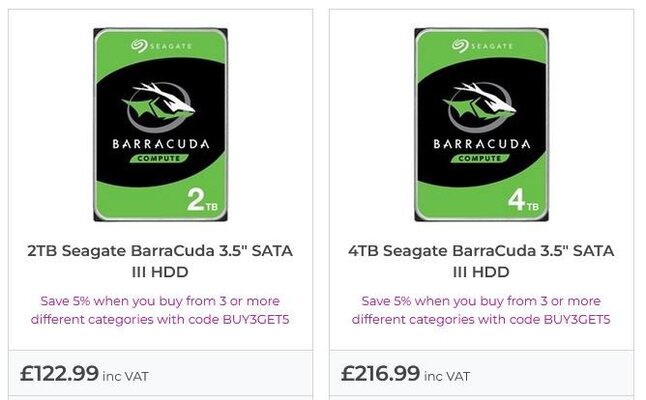
prices have changed again 4tb last week i checked was over 120.00 for solid hard drives ssd's are expensive as well
even ive bought used ssd's due to the expensive price of them at the moment and hard drives are stupid prices
prices have changed again 4tb last week i checked was over 120.00 for solid hard drives ssd's are expensive as well

ajlelectronics
Forum Supporter
- Messages
- 11,279
- Location
- Gloucester, England
how old is the pc?
Using Internet Explorer, well past its first flush of youth I would say!